

Task Planner | Period lifecycle and dates
Introduction
Every Task Planner period goes through four statuses and moves in one direction only. Opening is the only manual step: CheckOP makes the other changes based on the period dates. Knowing these statuses and dates avoids most planning questions.
Period statuses
| Status | How it is reached | What happens |
|---|---|---|
| Draft | When the period is created | All data can be adjusted. Owners do not see it yet and nobody schedules. |
| Open | Manual, with Open period | This is the window to schedule and publish. Dates, cutoff, limit, scheduling type and owners become fixed. |
| In progress | Automatic, on the start date | Tasks are executed. Scheduling becomes read-only. |
| Closed | Automatic, the day after the end date | Unpublished draft clients are discarded. Indicators become final. |
What you can do in each status
| Action | Draft | Open | In progress | Closed |
|---|---|---|---|---|
| Visible to owners with Read | No | Yes | Yes | Yes |
| Edit period data | All | Name (and working hours with Date and time) | Name (and working hours with Date and time) | Nothing |
| Delete the period (requires Delete) | Yes | Yes | Yes | Yes |
| Enter the detail (Summary, Scheduling, Compliance) | No | Yes | Yes | Yes |
| Schedule and save draft | No | Yes | Read-only | Read-only |
| Publish | No | Yes | No | No |
Important: the only window to schedule and publish runs from the moment the period is opened until the day before its start date. Whatever is still in draft when the start date arrives can no longer be published and is discarded at closing.
Date rules
- From (start): must be later than today. The calendar only allows dates from tomorrow on. This is the date that closes scheduling, because on that day the period moves to In progress.
- To (end): same as or later than the start. The next day the period moves to Closed.
- Cutoff date: chosen between today and the day before the start. It is the deadline the coordinator gives the team to have the plan published. It is informational: it does not change the status or block publishing.
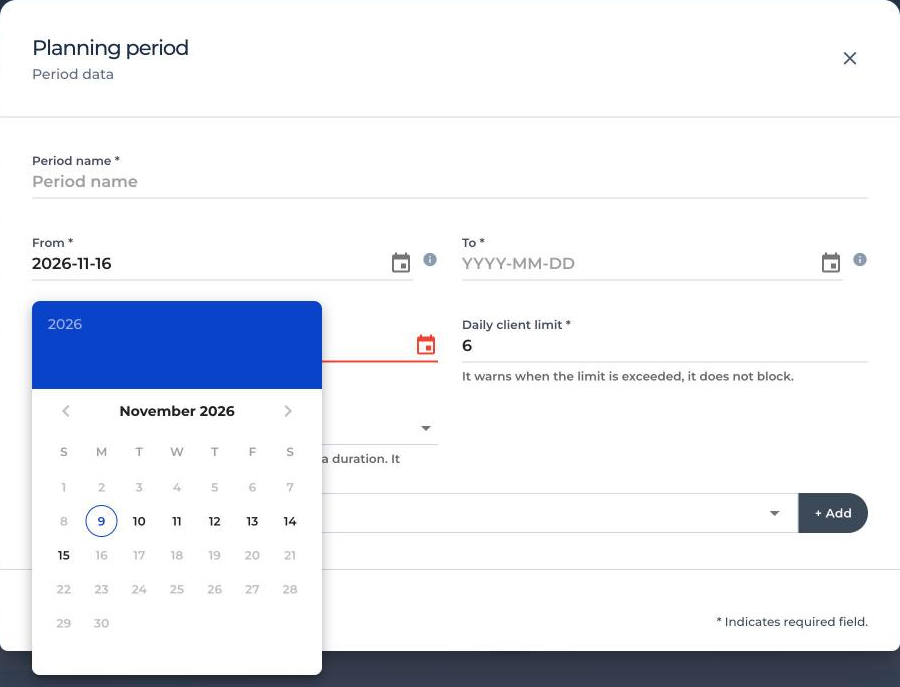
Date example
Today is Monday, November 9 and the coordinator creates a period for the following week:
| Date | What happens |
|---|---|
| Monday, November 9 | The period is created in Draft with From November 16 and To November 20. The earliest possible From date was Tuesday the 10th. |
| Tuesday, November 10 | The coordinator opens the period. Owners can now schedule. |
| Thursday, November 12 | Agreed cutoff date. It could be any day from the 9th to the 15th. The Summary reminds who still has to publish. |
| Friday 13 to Sunday 15, November | Whoever has not published can still do it: the cutoff does not block. |
| Monday, November 16 | The period moves to In progress. Scheduling and publishing are closed. |
| Saturday, November 21 | The period moves to Closed. Unpublished drafts are discarded. |
You cannot plan backwards
A period start must always be later than today. To record work from past days, create the Tasks directly from the Tasks module.
Draft with a past start date
If the start date of a Draft has already arrived, CheckOP does not open it and shows the message: «The start date has already arrived: if you open the period it will be In progress and it will not be possible to schedule». Edit it from Actions > Edit so the start is later than today and open it again.
Note: the screenshots in this article show the interface in Spanish.